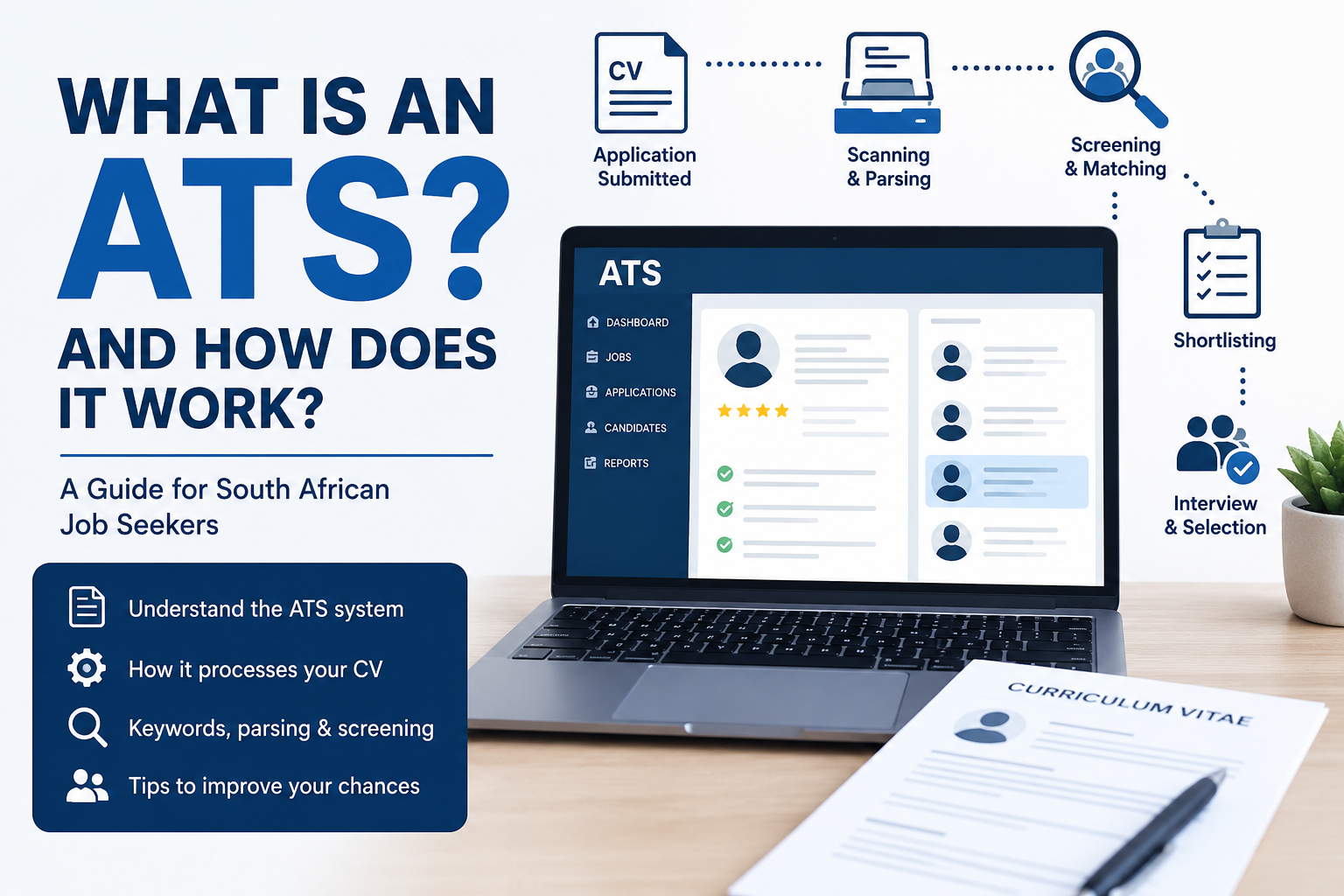
If you want to know What Is an ATS and How Does It Work, this guide covers how recruitment software processes your CV when you apply for jobs online. In many cases, your application goes through an Applicant Tracking System before a recruiter ever sees it
For job seekers, understanding what an ATS is can help explain what happens to your CV after you click “Apply” and why the way you structure your CV can matter.
An ATS is not simply a robot that decides whether you deserve a job. It is software used by employers and recruitment teams to help manage applications, organise candidate information and support different stages of the hiring process. Depending on the system and how the employer has configured it, an ATS may parse CVs, extract information, search for relevant terms and help recruiters filter or organise candidates.
This guide explains what an ATS is, how it works, what information it can read from your CV, why keywords matter and what South African job seekers should know before creating an ATS-friendly CV.
What Does ATS Stand For?
ATS stands for Applicant Tracking System.
An Applicant Tracking System is software used by employers to manage recruitment and job applications.
Imagine that a company advertises one position and receives hundreds of applications. Instead of managing every application manually from separate emails and documents, the employer can use an ATS to collect and organise applications in one system.
The system may store information about candidates, help recruiters search applications and track applicants as they move through the recruitment process.
Different ATS platforms have different features, so there is no single ATS process that applies to every employer. Some systems provide more advanced screening and matching functions than others.
Why Do Employers Use an ATS?
Recruitment can involve a large amount of information.
For example, a company advertising a customer service position could receive hundreds of CVs. A government department, large company or organisation may also use an online recruitment system to manage applications for multiple vacancies.
An ATS can help the recruitment team keep these applications organised.
Depending on the system, an ATS can help employers:
- Collect online applications.
- Store CVs and candidate information.
- Organise applications according to vacancies.
- Extract information from CVs.
- Search candidate information.
- Filter applicants according to selected criteria.
- Identify relevant skills and qualifications.
- Track candidates through different recruitment stages.
- Manage communication and other recruitment activities.
The purpose is generally to make the recruitment process easier to manage rather than requiring recruiters to manually organise every application.
How Does an ATS Work?
The exact process depends on the employer and the ATS they use, but a typical online application can involve several stages.
Step 1: You Find a Vacancy
You find a job that matches your qualifications, skills and experience.
Before applying, you should always read the vacancy advertisement carefully.
Look at:
- The job title.
- Minimum qualifications.
- Required experience.
- Skills.
- Duties and responsibilities.
- Location.
- Closing date.
- Application instructions.
The job advertisement is particularly important because it tells you what the employer is looking for.
If you need help understanding the general CV-writing process, see our guide:
How to Write a Professional CV for Jobs in South Africa
That guide covers the basic structure and content of a professional CV before you start thinking specifically about ATS optimisation.
Step 2: You Submit Your Application
You may be asked to upload your CV through the employer’s careers website or recruitment platform.
You may also have to complete an online application form.
For example, the system could ask you to enter your:
- Name and contact details.
- Education.
- Work experience.
- Qualifications.
- Skills.
- Certifications.
- Other information relevant to the vacancy.
Your CV may then be stored in the employer’s recruitment system.
Step 3: The ATS Parses Your CV
One of the important processes is called parsing.
Parsing means that the software attempts to read your CV and extract information from it.
For example, your CV might contain:
Warehouse Clerk
ABC Distribution Centre
January 2022 – December 2024
The ATS may attempt to identify:
- Job title.
- Employer.
- Employment dates.
- Work history.
It may also extract information from sections such as your education and skills.
Current ATS guidance describes parsing as a core function of these systems, alongside extracting and indexing candidate information so recruiters can search it.
This is one reason why a simple and clearly structured CV can be helpful.
What Information Can an ATS Read?
An ATS may extract different types of information from your CV.
This can include:
Contact Information
Your name, phone number, email address and other contact information.
Education
Your qualifications, institutions and other educational information.
Work Experience
Your previous job titles, employers, employment dates and descriptions of your responsibilities.
Skills
Technical skills, computer skills, communication skills and other relevant abilities.
Certifications and Qualifications
Professional certifications, licences and qualifications where applicable.
The exact information extracted depends on the ATS and how the employer’s recruitment process is configured.
What Are ATS Keywords?
You will often hear people talk about ATS keywords.
Keywords are important words or phrases connected to the vacancy.
For example, suppose an employer advertises a position for a Data Capturer.
The job advertisement might mention:
- Data capturing.
- Microsoft Excel.
- Microsoft Office.
- Record management.
- Administrative support.
- Accurate data entry.
These terms can help you understand the skills and experience the employer is looking for.
Some ATS systems can compare information in applications with criteria associated with the vacancy. Recruiters may also search candidate databases using relevant terms.
This does not mean you should copy the entire job advertisement into your CV.
Instead, if you genuinely have a skill or experience mentioned in the advertisement, describe it naturally in your CV.
For example:
Weak:
Computer literate.
More specific:
Microsoft Office, Microsoft Excel and data capturing.
The second version gives the employer more useful information.
Does an ATS Automatically Reject CVs?
This is one of the biggest myths surrounding ATS technology.
You may have seen advice saying:
“If your CV doesn’t get a high ATS score, the robot will automatically reject you.”
That is an oversimplification.
ATS systems vary considerably, and employers configure their recruitment processes differently. Some systems can help recruiters filter, match or rank candidates, while others are primarily focused on collecting and organising applications.
Therefore, you should not think of an ATS as one universal system that works exactly the same way for every company.
In some recruitment processes, an ATS may play an important role in screening candidates. In others, a recruiter may review applications using information stored in the system.
The safest approach is to create a CV that is both ATS-readable and useful to a human recruiter.
Why Does CV Formatting Matter?
The information on your CV needs to be understandable.
A complicated design may look attractive to a person, but certain formatting elements can make information harder for some systems to interpret.
Current ATS guidance commonly recommends a straightforward layout, standard headings and avoiding unnecessary design elements such as tables, text boxes, graphics and charts.
For example, use straightforward headings such as:
- Professional Summary.
- Work Experience.
- Education.
- Skills.
- Certifications.
Instead of using unusual headings such as:
- My Journey.
- What I Bring.
- My Toolbox.
Simple headings make the structure of your CV immediately clear.
Does an ATS-Friendly CV Mean You Should Have a Boring CV?
Not necessarily.
An ATS-friendly CV does not mean your CV needs to look unprofessional.
The goal is to prioritise clarity and readability.
You can still use:
- Bold headings.
- Consistent spacing.
- Professional fonts.
- Clear bullet points.
- Good section organisation.
- Appropriate margins.
The problem is not making your CV visually clean.
The problem is using design elements that make important information difficult for software or recruiters to identify.
A simple CV can still look professional.
Should You Use Tables in an ATS CV?
For an ATS-focused CV, it is generally safer to avoid tables.
Tables can sometimes cause information to be read in an unexpected order when the document is processed by recruitment software.
For example, instead of putting your skills into a table with multiple columns, use a simple list:
Skills
- Data Capturing
- Microsoft Excel
- Record Management
- Customer Service
- Stock Control
This is easier to read for both the applicant and the recruiter.
Current ATS guidance recommends a single-column layout and avoiding tables, text boxes, graphics and charts.
Why Should You Use Standard CV Headings?
Standard headings help organise your information.
For example:
Professional Summary
Work Experience
Education
Skills
Certifications
These headings clearly tell the reader what information follows.
They can also help ATS software identify different sections of your CV.
Using standard headings is therefore a simple change that can improve the clarity of your CV without requiring special software.
Should You Put Keywords Everywhere?
No.
One common mistake is trying to fill a CV with as many keywords as possible.
For example, if a job advertisement mentions “customer service” five times, you should not repeat “customer service” twenty times simply because you think it will improve your ATS results.
Your CV should remain natural and truthful.
Use relevant keywords where they accurately describe your:
- Skills.
- Work experience.
- Qualifications.
- Professional summary.
- Achievements and responsibilities.
The goal is to show that you have the relevant experience, not to manipulate the system.
There can also be problems with excessive optimisation or misleading information. Your CV should always accurately represent your background.
Should You Use the Exact Job Title From the Advertisement?
Where appropriate and truthful, using the same job title as the vacancy can make your CV clearer.
For example, if the advertised position is:
Administrative Clerk
and your previous experience genuinely involved administrative clerk work, you can use the appropriate job title that accurately reflects your role.
However, you should never change your job title to something false simply to match a vacancy.
Honesty is more important than trying to manipulate an ATS.
If your previous job title was different but your responsibilities were relevant, explain those responsibilities clearly.
Can You Have One CV for Every Job?
You can have a main CV, but it is usually better to tailor your CV for the particular vacancy.
A person applying for a warehouse position may want to highlight:
- Stock control.
- Inventory.
- Receiving and dispatching.
- Warehouse operations.
- Record keeping.
Someone applying for a customer service position may instead want to highlight:
- Customer service.
- Communication.
- Problem solving.
- Complaint handling.
- Client support.
The important thing is that you only highlight skills and experience you genuinely possess.
Tailoring your CV helps make your application more relevant to the position.
ATS Does Not Replace the Recruiter
Another important point is that an ATS is a recruitment tool, not necessarily the final decision-maker.
Recruitment software can help organise and process applications, but employers still decide how candidates are assessed and who progresses through the recruitment process.
A recruiter may review your CV, qualifications, experience and other application information before deciding whether you should move forward.
This is why your CV should be written for both the technology and the person reading it.
A CV that contains the right keywords but does not clearly explain your experience is unlikely to be a strong application.
What Happens After the ATS?
If your application progresses through the employer’s screening process, it may move to another stage.
Depending on the employer, this could involve:
Application → Screening → Shortlisting → Interview → Selection
However, not every employer uses these exact stages.
Some employers may ask candidates to complete assessments, provide additional information or attend more than one interview.
The ATS can help recruiters track candidates through these stages.
Do All Employers Use ATS?
No.
Not every employer uses an ATS, and different organisations use different recruitment systems.
Some employers may accept applications by email, while others use their own recruitment portals or third-party recruitment platforms.
Government departments and public-sector organisations may also use specific online recruitment systems.
Therefore, do not assume that every CV you submit will go through exactly the same ATS process.
The important lesson is to follow the employer’s application instructions carefully.
How Can South African Job Seekers Prepare?
If you regularly apply for jobs in South Africa, you should develop a CV that is:
- Clear.
- Professional.
- Easy to read.
- Relevant to the vacancy.
- Honest.
- Well structured.
- Easy for recruitment software to process.
Start by understanding the vacancy.
Then identify the qualifications, skills and experience that genuinely match your background.
After that, tailor your CV accordingly.
If you need help with the basic structure of a CV, start with our guide:
How to Write a Professional CV for Jobs in South Africa
Once you understand the basics, you can move to our more detailed guide:
How to Write an ATS-Friendly CV in South Africa: A Complete Guide
That guide focuses specifically on creating and formatting a CV for online applications, including sections, keywords, formatting and common ATS-related mistakes.
Common ATS Mistakes to Avoid
Here are some mistakes job seekers should avoid when preparing an ATS-friendly CV:
Using Too Many Graphics
Images, charts, logos and decorative graphics can make a CV harder for some systems to process.
Using Complicated Columns
A multi-column design may look modern but can sometimes cause information to be read in the wrong order.
Hiding Information in Text Boxes
Important information should be written directly into the main document rather than hidden inside design elements.
Using Unusual Section Names
Stick with familiar headings such as Work Experience, Education and Skills.
Keyword Stuffing
Do not repeat keywords unnecessarily.
Adding Skills You Do Not Have
Never add qualifications, skills or experience simply because they appear in the job advertisement.
Sending the Same CV Everywhere
A generic CV may not clearly show how your experience matches the specific vacancy.
Ignoring the Human Recruiter
Even if your CV is ATS-friendly, a recruiter still needs to understand your application.
ATS-Friendly Does Not Mean “Beat the ATS”
You may see websites and social media posts talking about “beating the ATS.”
A better way to think about it is making your CV easy to process and relevant to the vacancy.
You are not trying to trick the recruitment system.
You are making sure that your genuine qualifications, skills and experience are presented clearly.
That means:
Read the job advertisement → Identify relevant requirements → Tailor your CV → Use clear formatting → Include genuine keywords → Check your application → Submit it correctly.
This approach is much more useful than trying to manipulate an automated system.
Final Thoughts
An Applicant Tracking System (ATS) is software that employers may use to manage job applications and support the recruitment process.
It can collect applications, parse CVs, extract candidate information and help recruiters search, filter or organise applicants. However, ATS systems differ between employers, so there is no single formula that guarantees that a CV will pass every system.
For South African job seekers, the best approach is to create a CV that is simple, professional, relevant and truthful.
Do not focus only on keywords.
Your CV should clearly explain what you have done, what skills you have developed and how your experience relates to the job you are applying for.
If you are new to CV writing, start with How to Write a Professional CV for Jobs in South Africa.
If you are ready to optimise your CV for online applications, continue with How to Write an ATS-Friendly CV in South Africa: A Complete Guide.
Understanding how an ATS works is only the first step. The real goal is to make sure your application clearly communicates your value to the employer while remaining easy for recruitment technology to process.
Good luck with your job search!