
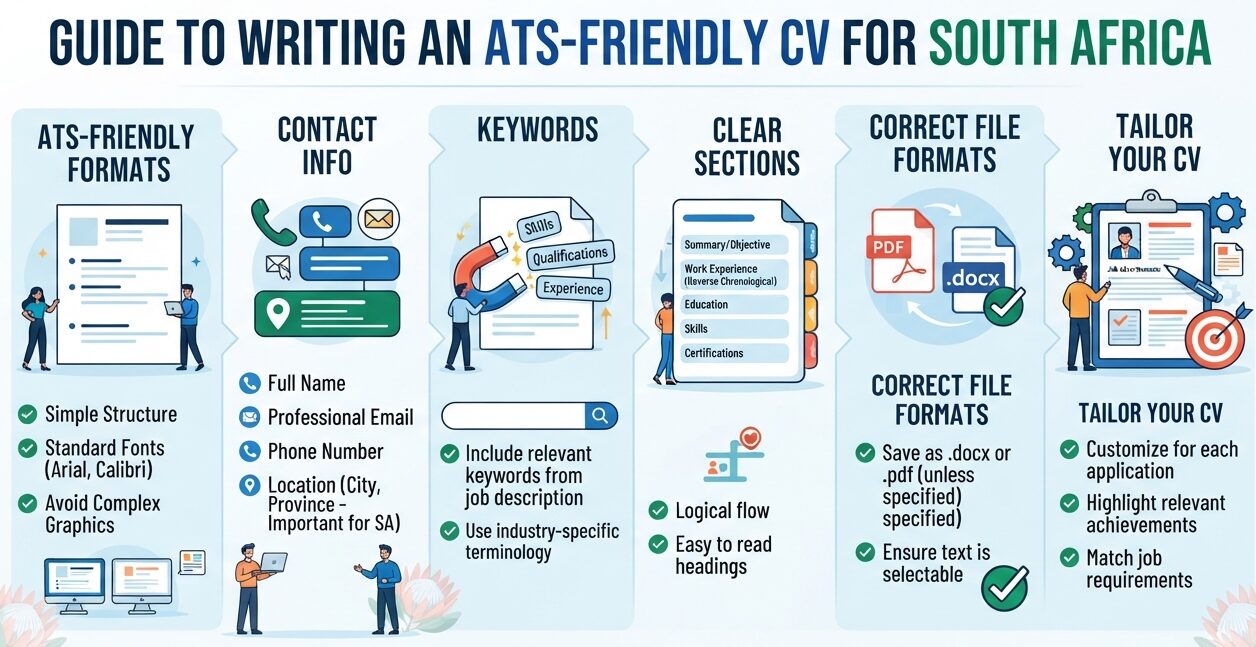
Submitting a CV online can be challenging. You may have the right qualification, skills and experience, but your application still needs to be easy for an employer or recruitment system to process.
This is where an ATS-friendly CV can help.
ATS stands for Applicant Tracking System. Employers and recruitment organisations may use these systems to collect, organise, search and manage job applications.
An ATS-friendly CV is designed with a clear structure, readable formatting and relevant information so that both recruitment software and human recruiters can understand your CV more easily.
However, creating an ATS-friendly CV does not mean trying to trick or “beat” a recruitment system.
The goal is simple:
Make your genuine qualifications, skills and experience clear, relevant and easy to understand.
In this ALLjobs South Africa guide, you will learn how to create an ATS-friendly CV, how to identify keywords in a job advertisement, which formatting choices to avoid and how to tailor your CV for different jobs in South Africa.
What Does ATS Mean?
ATS stands for Applicant Tracking System.
An ATS is software that employers or recruitment organisations can use to manage job applications.
Depending on the system and how the employer uses it, an ATS may help with tasks such as:
- Collecting applications
- Storing CVs
- Organising candidates
- Searching applications
- Identifying qualifications and skills
- Managing recruitment stages
For example, a company advertising for an Administrative Clerk may receive hundreds of applications.
The recruitment team may need to find applicants with skills such as:
- Data capturing
- Microsoft Excel
- Customer service
- Filing
- Record management
- Computer literacy
A clearly written CV makes it easier for the relevant information to be identified.
Does Every Employer in South Africa Use an ATS?
No.
Not every employer uses the same recruitment software or recruitment process.
Some employers may use an ATS, while others may review CVs manually, use an online recruitment portal or use their own application system.
This is why you should not create a CV only for a computer.
Your CV should work for both technology and people.
A good CV should be:
- Easy to read
- Relevant to the vacancy
- Professionally presented
- Accurate
- Easy to scan
- Properly formatted
- Tailored to the job
Why Should Your CV Be ATS-Friendly?
Many job applications are now submitted online.
Your CV may be uploaded to:
- Company career websites
- Recruitment websites
- Government recruitment portals
- Graduate programme portals
- Learnership application systems
- Internship application systems
- Recruitment agency websites
The way information is displayed in your CV can affect how easily it can be read and processed.
An ATS-friendly CV therefore focuses on clear information rather than complicated design.
But remember:
An ATS-friendly CV does not guarantee an interview.
You still need to meet the employer’s requirements and show why you are suitable for the position.
How to Write an ATS-Friendly CV in South Africa
1. Start With the Job Advertisement
Do not start by changing your CV immediately.
First, read the vacancy carefully.
Look for:
- Job title
- Minimum qualification
- Required experience
- Technical skills
- Computer skills
- Industry knowledge
- Licences
- Certifications
- Responsibilities
- Important keywords
For example, imagine an employer advertises:
Warehouse Clerk
The advertisement may mention:
- Stock control
- Inventory management
- Data capturing
- Receiving and dispatch
- Computer literacy
- Microsoft Excel
These are important terms to consider when preparing your CV.
If you genuinely have these skills or experience, make sure they are clearly shown in your CV.
2. Identify the Important Keywords
Keywords are words and phrases that describe the qualifications, skills, experience and requirements of a position.
Example job advertisement
Imagine the vacancy says:
“The successful candidate must have experience in data capturing, Microsoft Excel, record keeping and customer service.”
Important keywords could include:
- Data capturing
- Microsoft Excel
- Record keeping
- Customer service
If you genuinely have these skills, you can include them naturally in your:
- Professional Summary
- Skills section
- Work Experience
- Education or training section where relevant
ALLjobs Tip
Do not add a keyword just because you saw it in the advertisement.
If you have never used SAP, for example, do not add SAP to your CV simply because the employer mentioned it.
Your CV must remain truthful.
3. Use a Simple Single-Column Layout
A simple layout is one of the safest choices for an ATS-friendly CV.
A basic structure could be:
FULL NAME
Contact Details
Professional Summary
Key Skills
Work Experience
Education
Certifications
Additional Information
References
A single-column structure gives your information a clear reading order.
Avoid unnecessary design elements such as:
- Multiple columns
- Large graphics
- Decorative icons
- Skill bars
- Text inside images
- Complicated tables
- Large sidebars
- Important information hidden inside shapes
A professional CV does not need to look like a poster.
4. Use Standard CV Headings
Use headings that recruiters immediately understand.
Recommended headings include:
- Professional Summary
- Career Objective
- Key Skills
- Work Experience
- Employment History
- Education
- Qualifications
- Certifications
- Professional Training
- Languages
- References
For example:
Good
Work Experience
Less useful
My Career Journey
Standard headings make your CV easier to navigate and understand.
5. Use a Professional, Readable Font
Your CV should be easy to read on a computer, phone and printed page.
Common professional fonts include:
- Arial
- Calibri
- Times New Roman
- Helvetica
- Verdana
A body-text size of around 10–12 points is generally readable.
Use larger text for headings where appropriate.
Avoid decorative fonts that make your CV difficult to read.
South African government employment guidance also emphasises that CVs should be clear, concise, well presented and free from spelling and typing errors.
6. Write a Strong Professional Summary
Your professional summary appears near the top of your CV.
It should quickly tell the employer:
- Who you are
- What experience you have
- What skills you offer
- What type of opportunity you are seeking
Example: Administrative Job
Professional Summary
Detail-oriented administrative professional with experience in data capturing, record management, customer service and Microsoft Office. Experienced in maintaining accurate records, supporting daily operations and working effectively in busy environments. Seeking an opportunity to contribute strong administrative and organisational skills to a professional team.
Example: Mechanical Engineering Opportunity
Professional Summary
Mechanical Engineering candidate with N6-level technical studies and knowledge of mechanical engineering principles, maintenance and technical operations. Strong interest in gaining practical industry experience and developing technical skills in a professional engineering environment.
Only use information that accurately describes your background.
7. Create a Relevant Skills Section
Your skills section should focus on skills that are relevant to the vacancy.
Example: Administrative Clerk
Key Skills
- Data Capturing
- Microsoft Word
- Microsoft Excel
- Record Management
- Filing
- Customer Service
- Administrative Support
- Report Writing
- Communication
- Time Management
Example: Warehouse Position
Key Skills
- Stock Control
- Inventory Management
- Receiving and Dispatch
- Picking and Packing
- Data Capturing
- Stock Counting
- Record Keeping
- Warehouse Administration
- Microsoft Excel
- Health and Safety Awareness
Do not create a list of 30 or 40 skills simply to include keywords.
Choose skills you actually possess.
8. Show Your Skills in Your Work Experience
Listing a skill is useful, but showing how you used it is stronger.
Weak
Inventory Management
Better
Maintained accurate inventory records and assisted with regular stock counts.
Another example
Skill: Data Capturing
Instead of simply writing:
Data Capturing
you could write:
Captured and updated customer information accurately using computerised records.
This gives the recruiter evidence of how you used the skill.
9. Use Keywords Naturally
The same keyword can appear in different sections when appropriate.
For example:
Professional Summary
Experienced in data capturing and maintaining accurate records.
Key Skills
Data Capturing
Record Management
Work Experience
Captured customer information and maintained accurate electronic records.
This is natural because the keyword is supported by actual experience.
Do not repeat the same phrase unnecessarily.
10. Do Not Stuff Keywords Into Your CV
Keyword stuffing means adding excessive keywords simply to try to influence recruitment software.
For example:
Data Capturing, Data Capturing, Data Capturing, Microsoft Excel, Excel, Excel, Customer Service, Customer Service.
This does not make your CV stronger.
Instead, use keywords in meaningful sentences.
Poor
Microsoft Excel, Excel, Excel expert, Excel skills, Excel knowledge.
Better
Used Microsoft Excel to capture, organise and update information and maintain accurate records.
11. Tailor Your CV for Each Job
One of the most important CV rules is:
Do not use exactly the same CV for every vacancy.
South African government career guidance also recommends changing your CV to meet the needs of the specific job and emphasising the skills and experience that are most relevant to that position.
Example
You have experience in:
- Warehouse work
- Customer service
- Data capturing
- Inventory
- General assistance
You are applying for a Warehouse Clerk position.
Your CV should place more emphasis on:
- Stock control
- Inventory
- Data capturing
- Receiving
- Dispatch
- Record keeping
If you later apply for an Administrative Clerk position, you can place more emphasis on:
- Data capturing
- Customer service
- Microsoft Office
- Filing
- Record management
- Administrative support
You are not changing your history.
You are highlighting the experience that is most relevant to each opportunity.
12. Use the Correct Job Title
If you are applying for a specific position, make it clear what position you are targeting.
For example:
Administrative Clerk | Data Capturing | Customer Service
or:
Warehouse Clerk | Inventory | Stock Control
However, never change your previous employment history to a job title you did not actually hold.
Example
If your previous job was:
General Assistant
do not change it to:
Maintenance Technician
just because you are applying for a maintenance position.
Instead, describe the relevant duties you actually performed.
13. Use Bullet Points in Your Work Experience
Recruiters need to understand your experience quickly.
Avoid large blocks of text.
Instead of:
I was responsible for assisting customers, capturing information, maintaining records and helping the supervisor with administrative work.
Use:
- Assisted customers with routine enquiries.
- Captured and updated information accurately.
- Maintained organised records and documentation.
- Assisted the supervisor with daily administrative tasks.
Bullet points make important information easier to scan.
14. Start Your Bullet Points With Strong Action Words
Use clear action words where appropriate.
Examples include:
- Assisted
- Maintained
- Captured
- Managed
- Prepared
- Monitored
- Updated
- Coordinated
- Operated
- Inspected
- Recorded
- Supported
- Processed
- Organised
Example
Instead of:
Responsible for stock records.
Use:
Maintained accurate stock records and assisted with regular inventory counts.
15. Include Numbers When They Are Accurate
Numbers can make your experience more specific.
Example
Instead of:
Assisted customers.
You could write:
Assisted approximately 30 customers per day with routine enquiries.
Or:
Assisted with weekly stock counts and maintained inventory records.
Only use figures that are accurate.
Never invent numbers to make your CV appear more impressive.
16. List Your Work Experience Clearly
Use reverse chronological order in most cases, starting with your most recent relevant position.
Example
Administrative Clerk
ABC Company – Johannesburg
January 2024 – Present
- Captured and updated customer information.
- Maintained electronic and physical records.
- Assisted with administrative enquiries.
- Used Microsoft Excel to maintain records.
General Assistant
XYZ Organisation – Johannesburg
January 2022 – December 2023
- Assisted with daily operational activities.
- Maintained an organised work area.
- Supported team members with routine tasks.
South African government CV guidance similarly recommends presenting employment history and relevant responsibilities clearly.
17. Include Qualifications Clearly
Qualifications are particularly important when applying for:
- Graduate programmes
- Internships
- Learnerships
- Apprenticeships
- Technical positions
- Government positions
- Professional positions
Example
N6 Mechanical Engineering
Central Johannesburg College
Completed / In Progress
or:
National Senior Certificate (Matric)
ABC High School
2022
If you are still studying towards a qualification, make that clear.
Do not write completed if you have not yet completed the qualification.
18. Include Relevant Certifications and Licences
If the vacancy requires a licence, certificate or professional registration, make sure the relevant information is clearly visible.
Examples may include:
- Driver’s licence
- PDP
- Occupational certificates
- Computer certificates
- Trade certificates
- Health and safety certificates
- Professional registrations
Only include certifications that you actually hold.
19. Be Careful With Tables
Tables may look neat, but complicated layouts can make it harder for some systems to interpret the information correctly.
For an ATS-focused CV, normal text is generally the safer approach.
Instead of:
| Skill | Level |
|---|---|
| Microsoft Excel | Excellent |
| SAP | Good |
| Data Capturing | Excellent |
Use:
Key Skills
- Microsoft Excel
- SAP
- Data Capturing
Then explain your level of experience naturally in your work history.
20. Avoid Skill Bars and Star Ratings
You may see CVs using:
Microsoft Excel ★★★★★
or:
Communication ██████████ 90%
These designs do not explain what you can actually do.
Instead, describe your skills.
Example
Microsoft Excel: Data entry, sorting, filtering, spreadsheets and basic formulas.
This provides more useful information.
21. Avoid Putting Important Information Inside Images
Do not turn your CV into a picture.
A screenshot or image-based CV can make it difficult for software to extract the text.
Your name, contact details, qualifications, skills and experience should be real, selectable text.
Simple test
Open your CV and try to:
- Highlight the text.
- Copy it.
- Paste it into a plain-text document.
If you cannot select the text because everything is one image, recreate the CV as a proper document.
22. Be Careful With Headers and Footers
Some CV templates place contact details or other important information inside headers and footers.
For an ATS-focused CV, it is safer to keep important information in the main body of the document.
For example:
YOUR FULL NAME
Johannesburg, Gauteng
Phone Number
Professional Email Address
LinkedIn Profile
This keeps the information easy to identify.
23. Use a Professional Email Address
Your email address is part of your professional presentation.
A simple format such as:
is generally better than an email address containing jokes, nicknames or unnecessary numbers.
Make sure you check your email regularly when applying for jobs.
24. Give Your CV a Professional File Name
Do not save your CV as:
CV.pdf
or:
CV final final.pdf
Use a clear filename.
Example
YourName-CV.pdf
Or:
YourName-Administrative-Clerk-CV.pdf
A professional filename makes your document easier to identify.
25. Choose the Correct File Format
There is no single file format that works for every employer or recruitment system.
Always follow the instructions in the vacancy advertisement.
If the employer requests:
submit PDF.
If the employer requests:
DOCX
submit DOCX.
If both are accepted, use a properly formatted, text-based document.
Do not assume that changing the file format will solve every ATS problem.
The content and structure of your CV still matter.
Some South African government vacancy advertisements explicitly specify the required format and submission method. For example, certain Department of Employment and Labour vacancies require a combined CV in PDF and reject image formats such as JPEG or IMG.
26. Check Your CV After Saving It
Do not assume your CV looks correct simply because you saved it.
Open the final file and check:
- Is the formatting still correct?
- Are the headings visible?
- Can you select the text?
- Are the pages in the correct order?
- Are there any missing words?
- Are your contact details correct?
- Are your dates correct?
- Did your bullet points remain intact?
This is especially important when converting a Word document to PDF.
27. Check Your CV for Spelling Errors
A spelling mistake can change the meaning of a keyword.
For example:
Administraton
instead of:
Administration
or:
Maintanance
instead of:
Maintenance
Proofread your CV carefully.
South African employment guidance also stresses proofreading and avoiding spelling and typing mistakes.
28. Test Your CV as Plain Text
One simple way to check your CV is to copy its contents and paste them into a plain-text application such as Notepad.
Look at the order of the information.
You want to see something like:
Your Name
Contact Details
Professional Summary
Key Skills
Work Experience
Education
Certifications
If important information appears in a strange order, your formatting may be unnecessarily complicated.
ATS-Friendly CV Example: Before and After
Example 1: Professional Summary
Before
I am a hardworking person who is willing to learn and can work under pressure. I am looking for a job where I can grow.
After
Detail-oriented job seeker with experience in data capturing, customer service and record management. Reliable and organised, with strong computer skills and the ability to work effectively in busy environments. Seeking an opportunity to contribute to a professional team while developing further workplace experience.
The second version gives the recruiter more useful information.
Example 2: Work Experience
Before
I worked at a warehouse and did many different things.
After
Warehouse Assistant
ABC Distribution Centre – Johannesburg
- Assisted with receiving and dispatching stock.
- Updated inventory records.
- Assisted with stock counts.
- Prepared orders for dispatch.
- Maintained an organised and safe work area.
The second version clearly explains the experience and contains relevant terminology.
ATS Keyword Example for a South African Vacancy
Imagine you see a vacancy for:
Data Capturer
The advertisement mentions:
- Data capturing
- Microsoft Excel
- Record keeping
- Computer literacy
- Accuracy
- Administration
If these requirements match your actual background, your CV could contain:
Professional Summary
Administrative professional with experience in data capturing, record keeping and general office support. Computer literate with experience using Microsoft Excel to maintain accurate information and records.
Key Skills
- Data Capturing
- Microsoft Excel
- Record Keeping
- Computer Literacy
- Administration
- Attention to Detail
Work Experience
Captured and updated information accurately, maintained records and used Microsoft Excel to organise data.
This is a much better approach than simply copying the vacancy and adding all its words to your CV.
ATS-Friendly CV for Someone With No Work Experience
Not having formal work experience does not mean you cannot create a strong CV.
You can highlight:
- Education
- College studies
- Projects
- Practical training
- Volunteer work
- Job shadowing
- Internships
- Learnerships
- School activities
- Community involvement
- Transferable skills
South African educational guidance also recognises that applicants without employment experience can include relevant activities such as job shadowing, volunteer work, internships and school initiatives.
Example
Education
National Senior Certificate
ABC High School | 2025
Relevant Skills
- Computer Literacy
- Microsoft Word
- Microsoft Excel
- Communication
- Teamwork
- Time Management
School Project
Completed a group project that required research, planning, presentation and teamwork.
The key is to show what you have actually done rather than trying to invent employment experience.
ATS-Friendly CV for a TVET College Student or Graduate
If you have studied at a TVET college or another tertiary institution, make your qualification easy to identify.
Example
N6 Mechanical Engineering
TVET College Name
Completed / In Progress
Relevant Technical Knowledge
- Mechanical Engineering Principles
- Engineering Drawing
- Maintenance
- Workshop Practice
- Mechanical Systems
- Technical Problem Solving
Only include subjects or technical areas that you actually studied.
If the vacancy asks for a specific N-level or technical qualification, make sure your qualification is clearly stated.
ATS-Friendly CV for Learnerships and Internships
Learnership and internship applications can be competitive, particularly for applicants with limited experience.
Your CV should clearly show:
- Matric
- Relevant tertiary studies
- Current qualifications
- Technical skills
- Computer skills
- Projects
- Volunteer experience
- Relevant certificates
- Availability where requested
Example
If a learnership asks for:
Matric, computer literacy and good communication skills
your CV could include:
Education
National Senior Certificate (Matric)
Key Skills
- Computer Literacy
- Microsoft Word
- Microsoft Excel
- Communication
- Teamwork
Do not claim experience that you do not have.
ATS-Friendly CV for Government Jobs in South Africa
Government applications require special attention because the vacancy advertisement determines the application requirements.
For many South African public service vacancies, applicants are required to complete the Z83 Application for Employment form and attach a CV. The exact supporting documents and submission instructions should always be checked in the specific advertisement.
Some government vacancy advertisements also provide detailed instructions about the CV format, application form, reference number and email subject line. Failure to follow the instructions can affect an application.
Important
An ATS-friendly CV does not replace a required Z83 form or other application requirements.
If the advertisement says:
Complete the Z83 and attach your CV
you need to do both.
If the advertisement requests a particular file format, use that format.
If it asks you to quote a reference number, include it exactly as instructed.
ALLjobs Tip
Always read the full vacancy advertisement before submitting a government application.
Do not rely only on the job title.
Do Not Try to Trick an ATS
You may find advice online telling people to “beat” or “hack” an ATS.
Avoid these techniques.
Do not:
- Hide keywords using white text
- Add keywords that are unrelated to your experience
- Put hundreds of keywords into your CV
- Claim qualifications you do not have
- Change your employment history
- Add fake skills
- Copy the entire vacancy into your CV
- Use invisible text
These techniques do not make you a stronger candidate.
Instead, create a CV that accurately represents your background.
Common ATS-Friendly CV Mistakes
Mistake 1: Using the Same CV Everywhere
Solution: Tailor your CV to each relevant vacancy.
Mistake 2: Using Too Many Graphics
Solution: Keep the design simple and professional.
Mistake 3: Keyword Stuffing
Solution: Use relevant keywords naturally.
Mistake 4: Adding Skills You Do Not Have
Solution: Only include genuine skills.
Mistake 5: Using Complicated Tables
Solution: Use simple text and bullet points.
Mistake 6: Putting Important Information in Images
Solution: Use selectable text.
Mistake 7: Using Unusual Section Headings
Solution: Use standard headings such as Work Experience, Education and Skills.
Mistake 8: Ignoring the Job Advertisement
Solution: Read the requirements carefully before applying.
Mistake 9: Spelling Errors
Solution: Proofread your CV several times.
Mistake 10: Uploading the Wrong File
Solution: Follow the employer’s instructions.
ATS-Friendly CV Checklist
Before submitting your application, check the following:
☐ My CV is easy to read.
☐ I used a simple layout.
☐ My CV has a clear reading order.
☐ I used standard section headings.
☐ My important information is normal, selectable text.
☐ I avoided unnecessary graphics and complicated layouts.
☐ I identified relevant keywords from the vacancy.
☐ I used those keywords naturally.
☐ All the information in my CV is truthful.
☐ My professional summary is relevant to the job.
☐ My skills match the position where appropriate.
☐ My work experience demonstrates my skills.
☐ My qualifications are clearly listed.
☐ My employment dates are accurate.
☐ My contact details are correct.
☐ I checked my spelling and grammar.
☐ I followed the employer’s file-format instructions.
☐ My CV filename is professional.
☐ I checked the final version before submitting it.
Frequently Asked Questions About ATS-Friendly CVs
What does ATS stand for?
ATS stands for Applicant Tracking System. It is software that employers or recruitment organisations may use to manage job applications.
Does every company in South Africa use an ATS?
No. Employers use different recruitment systems and processes.
Can an ATS reject my CV?
An ATS can be configured to filter, organise or rank applications according to criteria selected by an employer. However, recruitment systems and processes differ between organisations.
It is therefore better to think of an ATS-friendly CV as a CV that is easy for recruitment systems and people to read, rather than a CV designed simply to avoid rejection.
What is the best CV format for an ATS?
A simple, single-column CV with clear headings and normal text is a practical choice.
However, always follow the employer’s instructions if they specify a particular format.
Should I use a PDF or Word document?
Follow the vacancy instructions.
If PDF is requested, use PDF.
If DOCX is requested, use DOCX.
If both are accepted, use a properly formatted, text-based document.
Is a two-column CV ATS-friendly?
A two-column layout can sometimes make information harder for a system to interpret in the intended order.
For this reason, a simple single-column layout is generally the safer option for an ATS-focused CV.
Should I use a photo on my CV?
For most job applications, a photo is not necessary unless the employer specifically requests one.
Focus on your qualifications, experience and skills.
Should I put my ID number on my CV?
Follow the requirements of the specific employer or application.
Avoid sharing unnecessary sensitive personal information when it is not required.
Different organisations may request different information, so always read the vacancy instructions carefully.
Should my CV be one page or two pages?
There is no universal page limit for every applicant.
Your CV should be concise while still providing enough relevant information to demonstrate your suitability.
For many entry-level applicants, one to two focused pages may be sufficient.
Always follow the employer’s instructions if a specific page limit is provided.
Can I use Canva for an ATS-friendly CV?
You can use a design tool, but be careful with templates that rely heavily on:
- Columns
- Graphics
- Icons
- Text boxes
- Images
- Decorative elements
A simple template with a clear reading order is preferable.
Can I use AI to write my CV?
AI tools can help you improve wording, structure and grammar, but you should always check the final CV yourself.
Make sure:
- Your information is accurate.
- Your experience is genuine.
- Your qualifications are correct.
- Your skills are real.
- Your CV matches the job.
Never allow an AI tool to invent work experience or qualifications.
Does an ATS-friendly CV guarantee an interview?
No.
An ATS-friendly CV can help make your information easier to process and understand, but it does not guarantee an interview.
You still need to meet the employer’s requirements and demonstrate why you are suitable for the position.
Final Thoughts
Creating an ATS-friendly CV is not about trying to trick recruitment software.
It is about presenting your real qualifications, skills and experience clearly.
Start with the job advertisement. Identify the requirements that genuinely match your background, then tailor your CV accordingly.
Use a simple layout, standard headings, readable fonts and relevant keywords. Avoid unnecessary graphics, complicated formatting and keyword stuffing.
If you are applying for a government position, learnership, internship, graduate programme or private-sector job, always follow the specific instructions in the vacancy advertisement.
Remember:
A good ATS-friendly CV should be easy for both recruitment systems and human recruiters to understand.
Your CV is not just a document for getting past an ATS. It is your opportunity to show an employer what you can offer.
Related ALLjobs South Africa Career Guides
Continue improving your job application with these guides:
Recommended guide
If you are starting with the main CV pillar, read:
How to Write a Professional CV for Jobs in South Africa
This guide explains the overall CV structure, while this ATS guide focuses specifically on making your CV easier to process during online job applications.